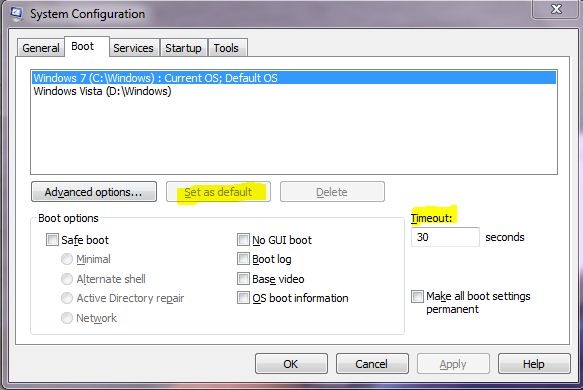
For multi boot computers , at the boot time users are given a choice to select the default operating system out of the all installed. One of the Operating system is highlighted by default and if option not changed the by default selected Operating system is launched.Generally the default selected OS is the one which is installed latter, but in case there is a need to change the default selected OS it can be changed as well.Steps to change the default OS to boot :
1.Press Win+R to launch the Run dialogue box.
2.Enter command “msconfig” and press enter.
3.It will launch a system Configuration Window.
4.Select the Boot tab in it.
5.You can see a list of OS you have installed , if you wish to make changes select the OS you wish to make default and click on “set as default” button.
6.Select OK to make the changes permanent.
Further you can reduce or increase the boot time out from default 30 seconds to the time out you wish to set.
Default boot menu can be set using some 3rd party utilities as well as using BCDEDIT in command prompt.