
Windows Vista and Windows 7 can be installed via a bootable USB drive as well.And the installation would be much easier and faster than installation via DVD.Windows Server 2008 & Windows Server 2008 R2 also can be installed via USB drive except installation of Windows 7 & Windows Vista .Initially Windows Vista/7 DVD or installation source (setup backup files stored on local hard disk) & a 4GB USB 2.0 Storage device would be required.You can follow the steps to install Windows Vista/7 from USB Drive.
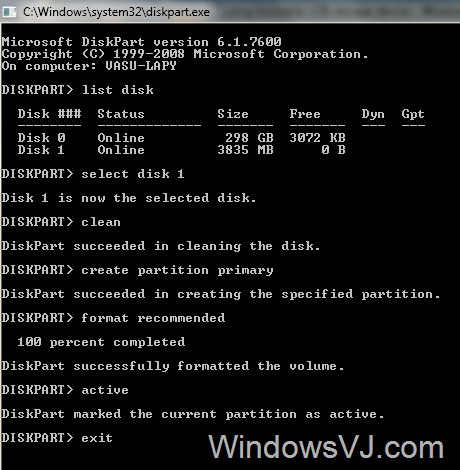
1. Plug your USB storage device and run CMD and execute the following commands one after another.
- Diskpart
Run Disk partition utility - List disk
To get disk index that is used to perform disk partitioning. - Select disk 1
Selects disk to perform disk partitioning. - Clean
Flush your existing all USB drive’s partitions. - Create partition primary
Creates a partition as primary partition. - Format recommended
Format your USB drive with recommended parameters. (No need to worry about file system format) - Active
Set the partition as active to hold bootmgr. - Exit
To quit Diskpart utility
2. After executing the above commands simply copy all Windows Vista/7 files from DVD/Backup storage to USB storage device.
3. Change boot settings from BIOS and set it to boot with your USB drive, you can install Windows Vista/7 via bootable USB storage device.That is it .
Note:For boot problems try Fixing your USB Storage drive with the command I:\Boot\Bootsect.exe /NT60 I: where I: is the drive letter of USB storage device
Tx to Ramesh @ WindowsValley.com for sharing this trick.