
Another post for the day,I have accumulated all of them since last weekend.Pushing them all at now.
Working online and using your Internet Banking Facility, Key logging Software’s can take out your password the moment you type them and further misuse them.You can simply take advantage of On screen Keyboard utility provided by Microsoft to type without using keyboard.It will bring a keyboard on your desktop and you can use your mouse pointer to click to type any key.
How to get it ?
1.Use Win+R key to get Run dialog box
2.Write "OSK" and press enter.
3.Your Onscreen Keyboard is at your service.
Alternatively you can find the same in
"StartMenu->All Programs->Accessories->Ease of Access->On screen Keyboard" .
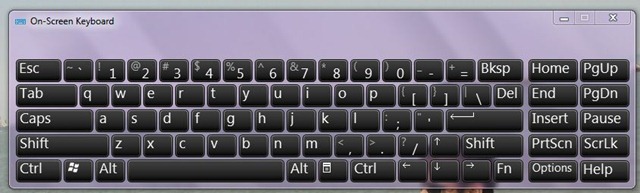
This is how a On Screen Keyboard looks in Windows 7 .
Hello from Russia!
Can I quote a post in your blog with the link to you?
Yeah sure.Definitely you can do the same.Kindly provide more details about you as well at my email address.And also provide the link after quoting my post.
Yo.
I i saw yer msg on windowsvj.com
Very informative
In fact I have been researching for this for months
windowsvj.com is just what I was looking for.
Great effort congratulations!
John
balera leotards
Thanks Jojo we apperciate your comments.You can subscribe for RSS Feeds, Twitter updates or SMS updates (for India) also.
Another great post.
Thank you for the information, Its good to see such quality posts.
Im subscribing to your blog.
Keep them comming.
Software for craigslist