
Ctrl+Alt+Del has been one of the rescue Key combos since the Windows Evaluation. And during succession of Windows it has changed the offers and functionality it provides to user.
In Windows 7 Ctrl+Alt+Del combo gives the following option
- Change Password
- Lock Computer
- Task Manager
- Logoff
- Start task Manager
However restrictions can be made on the above features using Group Policy Editor Setting. This setting may
- Prevent users from locking the system
- Prevent users from changing their Windows password on the Windows Security dialog box (which appears when you press Ctrl+Alt+Del).
- Prevent users from starting Task Manager
- This setting disables or removes all menu items and buttons that log the user off the system.
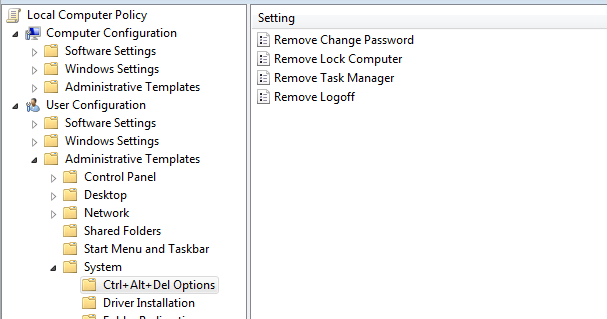
Steps to disable any of the feature :
- Open Run Dialogue Box (Win + R) and type gpedit.msc
- Navigate to Local Computer policy > User Configuration > Administrative Templates > System in left hand side pane.
- Select Ctrl+Alt+Del Options setting
- Select any of the setting you want to enable from right side pane. (Enabling a setting means disabling the feature)
- Open it and enable it .
- Press OK
A Reboot is required for the above setting to take place.