
A lot of Windows Mobile phones comes with a feature in messaging where number of deleted Messages are limited i.e the recycle bin of message box with a limit size of say 50 or 100 messages.
But its Windows OS, and Windows comes with a hidden yet powerful way of tweaking the settings using Registry. Using a free registry editor PHM Registry editor you may open the registry tree in Windows Mobile. (Analogous to typing Regedit in Windows Desktop).
1. Navigate to the key [HKEY_CURRENT_USER\Software\Microsoft\Inbox\SMS]
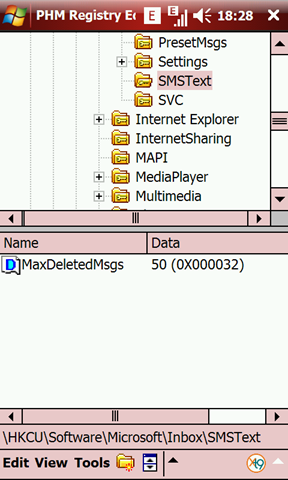
2. Select the key SMSText
3. It would show the MaxDeletedMsgs subkey with a data value of 50 (0x000032)
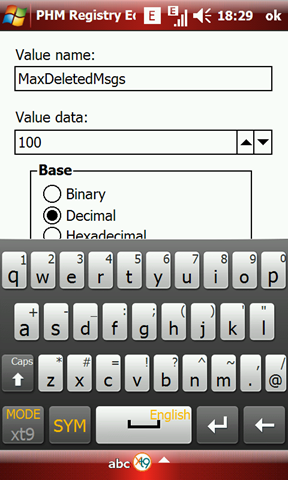
4. Double tapping on it opens an editor where you can change the value data. Change it to any number you like.
5. Save it and exit
Now the Deleted Msg Box list has increased. This trick may comes handy a lot of time.
Note: I have used the following trick on my Samsung B7610 Omnia Pro. Registry Keys & Messaging settings may differ on different Windows Mobile versions, Hardwares.
nice share
tx Vipul