


Facebook is catching up fast, after dominance of social networking sites like Orkut and Twitter in India. Here is a way to integrate your website or blog with Facebook. Bloggers have welcomed the integration of Social media in their blogs which promotes and make their blog’s presence felt over Social networks.
You can Import WordPress Blog Posts in Facebook through the Facebook notes application.
To activate this function in the new Facebook interface, this is what you need to do:
1.Navigate to Application settings in Account option in Menubar
2.Click on the Notes link and then click on ‘Import a Blog’ link 
3.Enter the RSS feed url of the blog which you want to import into Facebook.
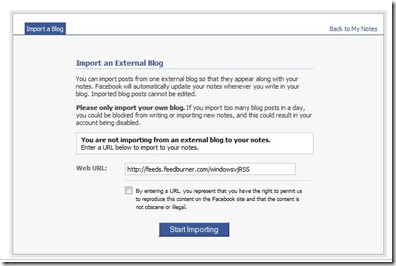
4.Confirm the Import of your blog.

Now every post of the blog you entered there would be imported in Notes in Facebook.