
What is Windows Intune??

Windows Intune simplifies how businesses manage and secure PCs using Windows cloud services and Windows 7—so your computers and users can operate at peak performance, from virtually anywhere.
It’s an all-in-one solution that brings together Microsoft® cloud services for PC management and malware protection with a Windows 7 Enterprise upgrade subscription.
Windows Intune can help your business in three key areas:
- Help manage and secure PCs anywhere with cloud services.
- Provide the best Windows experience with Windows 7.
- Fits your business with simple setup, maintenance, and billing
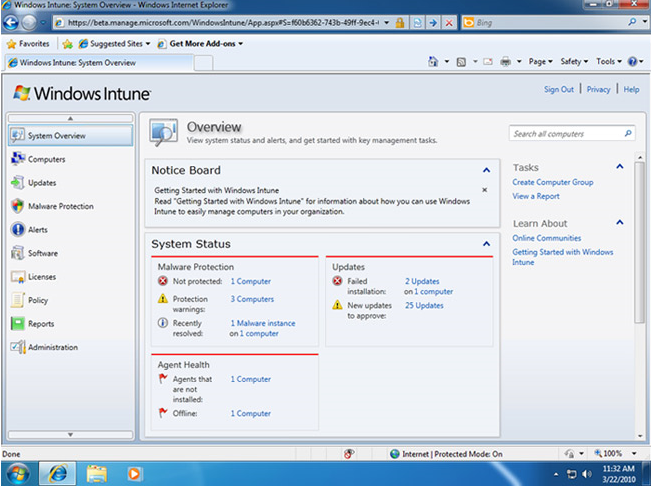
With the easy-to-use web-based console, you can access alerts, reports, security policies, and more. You just need an Internet connection and the Windows Intune client installed on each PC you wish to manage. Windows Intune can be used by in-house IT professionals or by solution providers to manage the PCs of multiple businesses.
Use the Windows Intune cloud service beta to:
- Manage updates
- Protect PCs from malware
- Proactively monitor PCs
- Provide remote assistance
- Track hardware & software inventory
- Set security policies
Technical requirements
The Windows Intune client software is supported on both 32-bit and 64-bit versions of:
- Windows 7 Enterprise, Ultimate and Professional
- Windows Vista Enterprise, Ultimate, and Business
- Windows XP Professional Service Pack (SP) 2 or SP 3 (recommended)
The Windows Intune client software has no additional hardware requirements for Windows 7 or Windows Vista-based computers. However, to install the client software on Windows XP-based computers you will need a CPU clock speed of 500 MHz or greater and at least 256 MB of RAM.
You will also require Administrator rights on the computer to complete the Windows Intune client software installation.To access the Windows Intune web console, administrators will need access to a web browser that supports Silverlight 3.0, such as Internet Explorer 7.0 or higher.
For more information check the following urls,
- http://www.microsoft.com/windows/windowsintune/pc-management.aspx
- http://technet.microsoft.com/en-us/windows/ff472080.aspx?ITPID=mscomgl
handy tool for managing windows
yes ha14……..it will be a handy tool…..