
Create a direct shortcut of your Website on your Desktop

October 26 2009one Commented

Categorized Under: Firefox, Internet, Internet Explorer, Tips n Trix

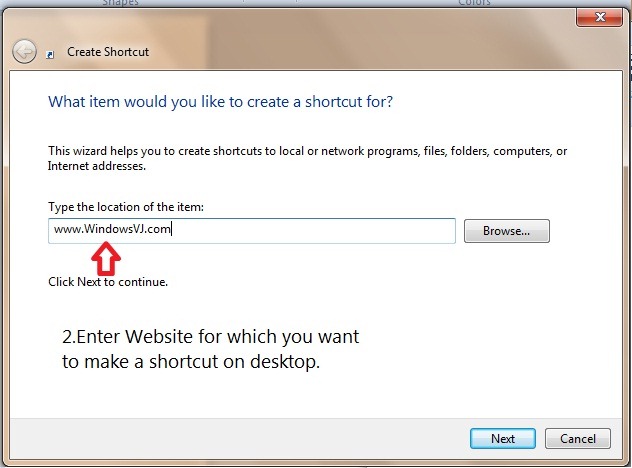
You can create a shortcut that directly takes to your website.But it is at desktop just like the application shortcuts.Steps to create a Website shortcut on your desktop :
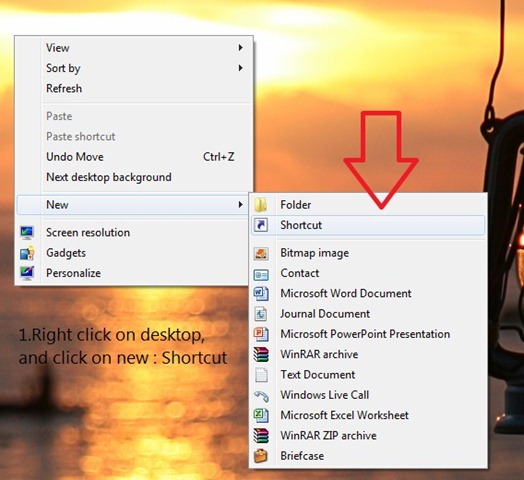
iescut1

iescut2

Thereafter you can give a name to the shortcut.
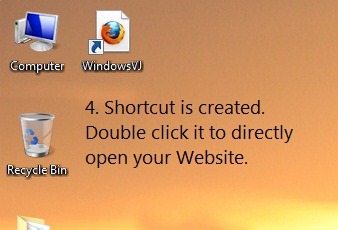
iescut4

Done.Your Favorite website now just a click (Double Click) away.

Digg This
Reddit This
Stumble Now!
Buzz This
Vote on DZone
Share on Facebook
Bookmark this on Delicious
Kick It on DotNetKicks.com
Shout it
Share on LinkedIn
Bookmark this on Technorati
Post on Twitter
Google Buzz (aka. Google Reader)

One Response to “Create a direct shortcut of your Website on your Desktop”

  1. How can I to learn more and more available and effective skills ?

Leave a Reply